Antigravity这套配置让AI连肝一夜不掉线
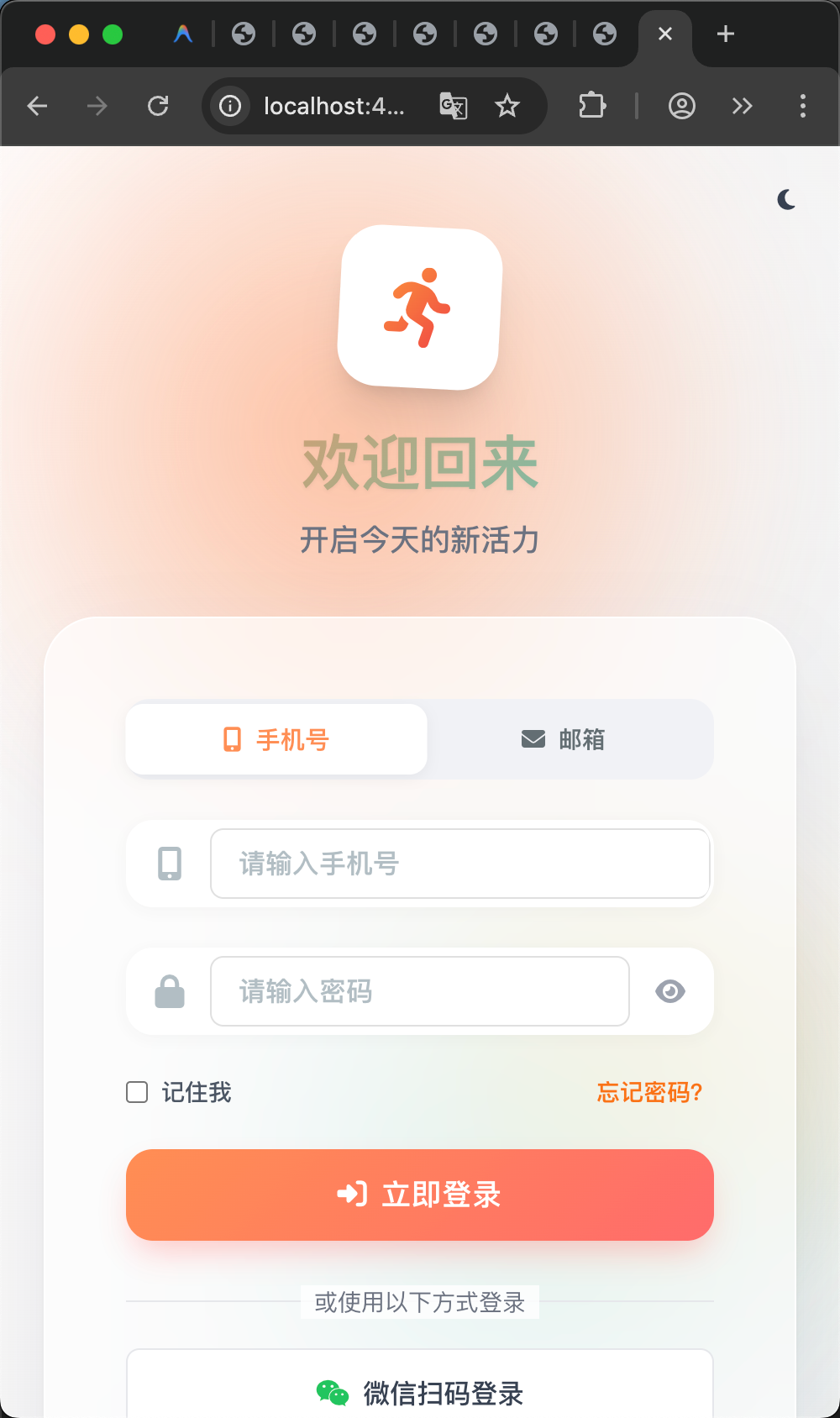
最近在使用Antigravity的时候,当涉及到UI重构或者前端测试、E2E测试的任务的时候,Agent需要使用浏览器,但是它只负责打开却不负责关闭,有时候如果任务执行一晚上,早晨起来就看到chrome的Tab页已经开的密密麻麻的了,资源浪费严重,下面附上解决方案:
在 Antigravity 的逻辑中,Agent 每进行一次验证(Verification),往往会倾向于开启一个“干净”的新 Tab 以确保测试环境隔离。但由于它没有被明确要求“做完功课要收书包”,所以导致了标签页泛滥。
要解决这个问题,最有效的方法不是在设置(Settings)里找开关(目前官方还没有“自动关闭 Tab”的硬开关),而是通过 Rules(规则) 来约束 Agent 的操作逻辑。
以下是三种层面的解决方案:
方案一:在项目规则中加入“标签页管理”指令(最推荐)
在你项目根目录的 .agent/rules/ 文件夹下,新建一个规则文件(例如 browser_cleanup.md),或者直接修改你现有的浏览器规则文件,添加以下内容:
# Browser Tab Management Rules
- **One Tab Policy**: Try to reuse the existing browser tab for tasks on the same domain/localhost.
- **Mandatory Cleanup**: ALWAYS close the browser tab immediately after the verification, screenshot, or data extraction is completed.
- **No Clutter**: Do not leave more than 2 tabs open at any time. If you need to open a new one, close the previous idle tabs first.
- **Explicit Exit**: Before ending a browser-related sub-task, ensure the `close_tab` or `browser_exit` tool is called.
为什么有效:
Antigravity 的 Agent 是根据这些规则来决定调用哪些“工具(Tools)”的。加上这条规则后,它在执行完 navigate(导航)和 capture(截图)后,会自动意识到需要额外调用一个 close 动作。
方案二:修改全局规则 (GEMINI.md)
如果你希望在所有项目里都解决这个问题,点击右上角 … -> Customizations -> Global (GEMINI.md),添加一行:
“Always maintain a clean browser workspace: close unused tabs after finishing a sub-agent task.”
随着我们的项目越做越大,经常在执行一个很耗时的任务的时候,比如执行全套的E2E测试,会看到Antigravity的运行log里出现如图的log信息:
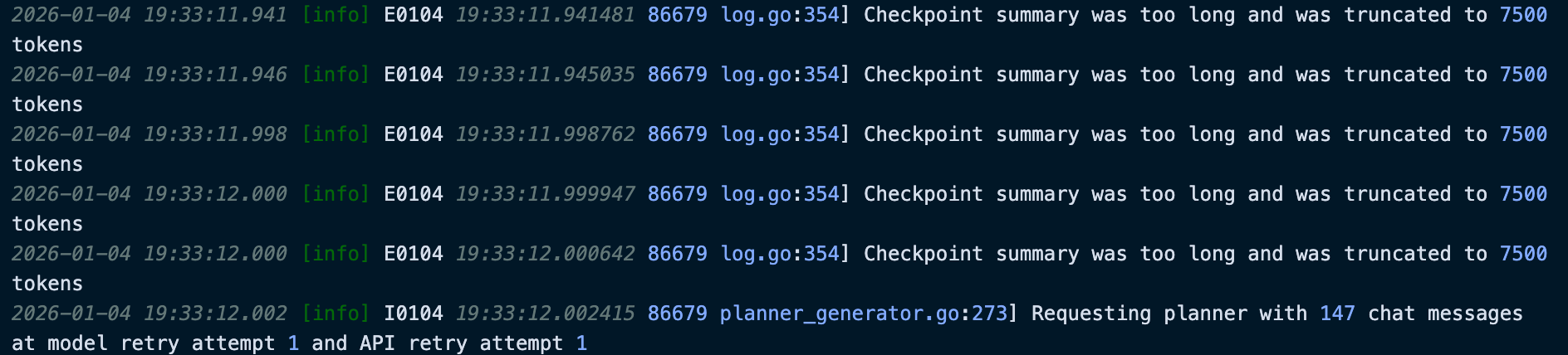
检查点摘要过长,已被截断至 7500 个令牌
补充说明
- Checkpoint:检查点,指Agent运行过程中保存的状态快照,用于断点续跑、恢复等操作。
- Tokens:可理解为文本被切分后的最小单位(一个单词、一个字或一个子词都可能是一个 token),模型的输入输出长度通常以 token 数量计量。
这是因为当前对话次数太多,积累的上下文也太大了,Agent为了方便记住之前做了什么不得不去做摘要,并分割成多个token以方便记忆,但是当对话内容过于庞大的时候,这种机制会让Agent明显降智和失忆,任务无法正常执行,就像人一样,要记住的事情太多了总会忘,就会造成接下来的逻辑错误。
我们也可以通过Rules也会优化,降低不必要的token浪费,使用大模型,token就是钱呀,附上我的Rules配置(包括之前的一些崩溃问题):
全局Rules(AGENT.md)
# Terminal Safety

- NEVER include shell comments (lines starting with #) in terminal commands.

- For commands likely to produce non-UTF8 output (like curl/binary tasks), redirect output to /dev/null or a file.

- Do not retry the exact same failing terminal script if it returns an encoding error.


# Always respond in Chinese-simplified

- Always respond in Chinese-simplified

- You MUST conduct your internal reasoning and thinking process entirely in Simplified Chinese. This is a strict requirement.


# Git & String Safety Rules

- **Simple Commits**: NEVER use emojis or complex multi-line summaries in `git commit -m`. Keep commit messages under 100 characters and plain text only.

- **Commit File**: If a detailed summary is needed, write it to a temporary file and use `git commit -F [file]`.

- **Emoji Restriction**: Avoid using emojis in terminal commands or output-heavy tasks to prevent UTF-8 truncation errors in the protobuf bridge.


# Browser Tab Management Rules

Always maintain a clean browser workspace: close unused tabs after finishing a sub-agent task.
项目Rules
# Browser Subagent Rules
- Before opening any localhost URL, run `curl -I [URL]` to verify the server is up.
- ALWAYS use the internal Browser Subagent for testing; do not use the system `open` command for external Chrome.
- If a page takes >20s to load, stop and report a timeout instead of waiting.

# Playwright Execution Rules
- **Serial Testing**: NEVER run multiple `npx playwright test` commands in parallel.
- **Headless Mode**: Use `--headed` ONLY if specifically requested for visual debugging. Otherwise, prefer headless mode to reduce IDE recording overhead.
- **Handling SIGTERM**: If a test returns exit code 143, do not immediately re-run it. Check `ps aux | grep playwright` first and ensure all browser instances are cleared.
- **Port Safety**: Before testing, verify localhost:4000 is returning a 200 status.

# Browser Tab Management Rules
- **One Tab Policy**: Try to reuse the existing browser tab for tasks on the same domain/localhost.
- **Mandatory Cleanup**: ALWAYS close the browser tab immediately after the verification, screenshot, or data extraction is completed.
- **No Clutter**: Do not leave more than 2 tabs open at any time. If you need to open a new one, close the previous idle tabs first.
- **Explicit Exit**: Before ending a browser-related sub-task, ensure the `close_tab` or `browser_exit` tool is called.
When debugging test failures, only read the last 50 lines of logs. Do not attempt to list or process thousands of test result files at once.
# Efficiency Rules

## 循环控制
- **Anti-Loop**: If a service check (curl) fails 3 times, STOP and ask me for help. Do not keep restarting.
- **Process Management**: When starting a dev server, do not use `&` in a raw shell command if possible; use the IDE's built-in terminal task.

## 上下文节约规则
- **消息阈值**: If the conversation exceeds 30 messages, proactively update `.agent/PROGRESS_LIVE.md` and suggest creating a handoff document.
- **命令输出**: If command output exceeds 50 lines, only read the last 50 lines using `tail` or similar. For E2E tests, only read the last 30 lines.
- **文件读取**: Always use `view_file_outline` first before reading specific lines. Avoid reading entire large files (>500 lines) at once.
- **搜索结果**: If grep_search returns more than 20 matches, narrow down the search scope instead of reading all results.
- **大输出处理**: For commands expected to produce large output, redirect to a temp file and only read relevant portions.

## 实时进度更新
- **进度文件**: After completing each major task item, update `.agent/PROGRESS_LIVE.md` with current status.
- **任务分解**: If a task is estimated to require more than 30 tool calls, break it into smaller sub-tasks first.

## 夜间/自主任务
- **检查点**: After completing 3 top-level task items, evaluate context usage and update progress file.
- **无中断**: During autonomous work, avoid notify_user unless absolutely blocked. Write progress to files instead.
- **恢复点**: Ensure `.agent/PROGRESS_LIVE.md` always contains enough information to resume work if session is interrupted.
大家可以参考一下,我的rules中还有涉及到夜间任务的,我喜欢在睡觉前给Antigravity布置可以连肝一夜的任务,下一篇分享如何如何在睡觉的时候保持AI不间断干活。
能看到这里的一定都是同道中人啦,点个关注&点赞&在看吧~
相关系列文章:
Antigravity常见的崩溃问题1 - UTF-8 编码冲突
Antigravity常见的崩溃问题2 - url无响应
Antigravity常见的崩溃问题3 - 上下文过载
Antigravity崩溃问题4 - Agent 要提交自己的工作报告作为 Git Commit 信息
Antigravity使用指南1 - 如何让agent的思考过程也显示中文
1-Process/01-项目/公众号运营/钢之AI术师/Antigravity这套配置让AI连肝一夜不掉线